Showing posts with label ETSOOI. Show all posts

Tuesday, February 20, 2024

Moon Crazy


Just a little something.  Taken at Schon Park, Glen Carbon.  


Unprocessed version below:


Friday, July 31, 2020

Prairie Flower


Taken about 2 minutes before yesterday's post.  There's a good bit of effects going on with this one.

Friday, May 01, 2020

A Place To Perch


Red Winged Blackbird hanging out on a piece of driftwood, at the edge of a pond....

Riverlands Migratory Bird Santuary, West Alton, MO

Tuesday, January 14, 2020

Winter Woods


Lots of post processing here, I'm rather pleased with how it turned out.  Late afternoon on an grey January day

Sunday, November 24, 2019

Accidental Barn


So, I was messing with my camera, while my wife drove across Indiana.  And I noticed a cool barn across the hill.  As I scrambled to get my setting right, the moment was racing away at 70 mph +/-.

I didn't quite make it.  Didn't beat the foreground tree.  Didn't get the exposure right, or the shutter speed, for that matter.  But I kind of liked the overall feel, and decided to do some "painterly" effects.  Not sure I'd hang this one on my wall, but it does capture the mood of the moment (IMHO).

The resulting photo actually made it to the "popular" page over at 365project, which just goes to show.

Monday, September 30, 2019

Yesterday

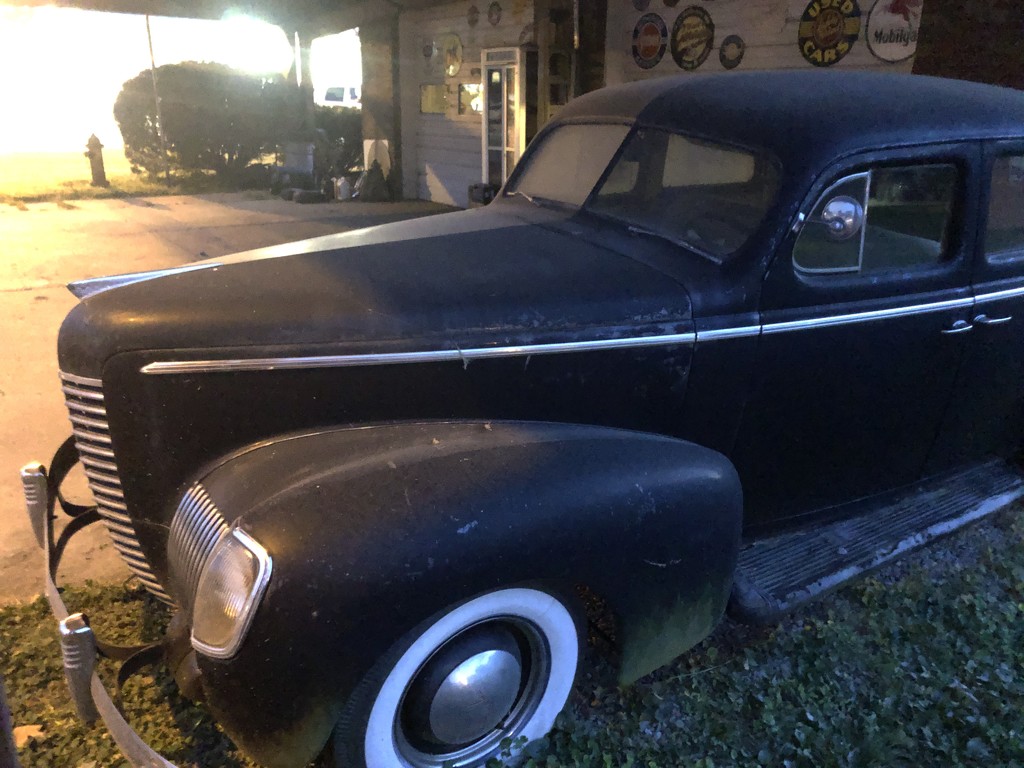
I believe this is an early 40's Ford... maybe 1941?? I'd welcome confirmation / correction if anyone knows more.  Looking at the internet, it seems likely, but I couldn't find anything that looked exactly right, especially the rectangular headlights.

Seen in the small town of Marine Illinois.  Just a humble photo from my iPhone, but I edited the stuffing out of it. Some time ago, I downloaded a free AP to my iPad called Inkwork... but I've never really been happy with it. In this case, I layered the Inkwork photo with the "normal" phot and blended to something I liked.


Below is the original, shot about 1/2 hr after sunset, handheld at 1/4 second exposure.  I was thinking B&W from the start, but the car kind of got lost in it, so I decided to play.  I'm pretty satisfied, actually.  And it made it to the Trending page over at 365project.


Workflow:
  1. Photo shot on iPhone 8.  Handheld.
  2. Basic modifications (brightness, contrast, etc) using Snapseed ap on my iPad
  3. Selective darkening (slight) on top left and bottom right.  Selective lightening (slight) along roof line
  4. Convert to black and white (still in snapseed)
  5. Export
  6. Open black and white version in Inkwork.  Apply effect (I don't remember exact settings)
  7. save.
  8. send all three files to computer (email)
  9. Open the two modified files, with the Inkwell image on bottom
  10. Add a very slight brown case to the inkwell layer (using a solid color layer, and screen blend)
  11. Merge the tint layer and the Inkwell layer
  12. Blend the basic black and white layer with the tinted inkwell layer till happy.
  13. flatten and save as.
  14. resize / sharpen for internet.
Sounds like a lot, but didn't take too long.


Saturday, August 03, 2019

Ponded


Highly edited, in fact ETSOOI.

Taken yesterday from the Old Chain Of Rocks Bridge.  This is looking north from the approach to the Mississippi River.  This area is usually dry, but not too uncommon to be flooded.  This is leftovers from our recent flooding.  Here's the original version with very minor edits (slight crop /levels)


By first thought was lack and whit (shocking, I know), but that didn't ring my bell.  So I decided to go with a sketch type direction.  Simplified process:
  • In Topaz Impressions plug in, apply one of the "sketch" presets. (I don't even remember which one)
  • Blend with the "normal" layer to balance the sketch with reality
  • Bring up the saturation a touch
Easy-peasy, huh?  The devil is in the details, though.

I thought about adding a digital mat and frame (as I've done before), but decided not to.

Tuesday, July 09, 2019

Summer Day


Scene from one of our local parks, "Greenspace East". Painterly effects added in Topaz Impressions. Frame effect added in Photoshop Elements.


For comparison, here's the starting point, after basic adjustments:


Wednesday, July 03, 2019

Half The Way There


Photographically, summer is probably my least favorite season.  At least here in the middle of the USA.  Everything is green, often including the ponds and lakes.  And so much green, with trees fully in leaves, bushes and undergrowth exploding...  Few vistas and the skies are more likely to be hazy and washed out....  Now, don't get me wrong, Green is probably my favorite color.  It's just that it gets a bit overwhelming this time of year, perhaps oppressive.

Or maybe I'm just complaining because it is hot and humid.

Anyway...  this is from last Sunday (6/30), taken at Watershed Nature Center.  Back in the North-West corner.  I rather liked the contrast of the dark, wooded part with the little clear area (I guess it qualifies as a meadow?),  with the trail leading into the light.  I was able to catch a little bit of sun-flare which I hoped accentuated the contrast.   blah, blah, blah.

When I took this I had in mind to use the Simplify filter to try and emphasize the shapes, hopefully offset some of the overall "green-ness".  After normal adjustments (crop / levels, etc),  I applied the filter to a layer, tweaked around the settings to get where I wanted, and then lowered the opacity of the layer until I was happy with the blending.

Overall, I'm satisfied with how it all turned out.

Sunday, April 14, 2019

Wildcat Hollow


Some folk think that any post-processing of a photo is heresy, anything except "straight-out-of-camera" (SOOC) is invalid.  I'm not one of those people.  Now, I'm not opposed to SOOC, and I agree that we (photographers) should strive to get the best possible image on the front end.  But...  things like crop, rotate, exposure tweaks, burn/dodge, adjust contrast?  I was doing all those things in a wet darkroom 40+ years ago.  I've always liked Ansel Adams' quote:  "The negative is comparable to the composer’s score and the print to its performance."

Now, all that is fine and dandy, but generally, the processing we're talking about is usually limited to the kinds of things I noted above (crop, rotate, exposure tweaks, burn/dodge).  That's not what we have here.  If Ansel Adams was talking about a symphony, this is free-form improvisation Jazz.

The original photo (see below) is quite dull.  I was trying to get a sense of layers, and the pt-quite-yet aspect of spring on this cool morning. The light was a bit harsh, the colors were a bit flat, my expectations were a bit low.  But I had a bit of a struggle finding this spot, and felt the need to try for a photo.  And I hoped that I could make something interesting with it.

Perhaps surprisingly, there's no crop or rotate or even exposure adjustment here.  I skipped the "normal" tweaks and went straight to the hard-stuff.  Now, I said it was Jazz, which means it's all improvised.  And not documented.  But my workflow was something like:  New Layer: Topaz Simplify to soften some of the harshness, and boost the colors a bit (significant tweaks from defaults).  Blend that layer with base.  Merge, then copy new layer.  Topaz Impressions on that layer, don't remember exact preset.  Resize for display size, then addtexture in Photoshop Elements.  Fram effect was manually added in Elements, there's 6 or 7 steps in that..


Here's the original:


Sunday, November 18, 2018

Winter Field - Before and After


Another one from Cliff Cave County Park, taken last week.  I've "Edited The Stuffing Out Of It" (ETSOOI).  I kind of like how it turned out.  And yes, I was thinking ETSOOI when I took the photo!

Of course, it is "Jazz", some free-form improvisation.  Not exactly sure how I got here, but something along the lines of:

  1. crop / straighten / adjust levels
  2. Topaz Studios Impressions (on a new layer).  Pretty sure it was the Pencil - Sketch Work III.
  3. adjust levels on that result
  4. Topaz Studios Simplify (on a copy of the original layer)
  5. Blend the two modified layers till it looks good.  
  6. Flatten
  7. Add texture in Photoshop Elements.  Pretty sure it's canvas
  8. I also cloned out a big snowflake spot (it was snowing when I took this).  Should've done that before adding the texture, but I dare you to find the spot... without looking at the "before" photo!


- - - - -


And the before photo, click to enlarge


Sunday, June 10, 2018

Under the bridge

Just a little something, playing with an image taken this weekend.  Taken from the trails that meander around the Chain of Rocks Bridge...  That's the bridge, of course.    From Choteau Island.

This one is also posted at 365project,


 Here;s the Straight Out Of Camera version, click for larger version.:


Monday, May 28, 2018

Truckin'

My first couple of thoughts on titles were bad puns on...  like "Trucked Up".  But I decided that was tacky and didn't go there...  Except, I suppose that I just went "there" here.  Oh well.

This is the old truck I found about a month ago, at Columbia Bottom Conservation Area.  Seems like I didn't post them here (shame on me!).  But you can check them out here, and here.  I revisted last weekend, a little earlier so there was a bit more light (and I knew where I was better).

Here's my favorite of the second series, others here, here and here.


So, I thought it would be interesting to do a "before and after" on this.  The's actually a fair amount of tweakage, though I hope it isn't too obvious. I wanted to make it "pop" more though.

Here's the SOOC (straight out of camera" version for comparison:


Monday, November 27, 2017

F O R D


Here's another before and after.  The after is at the bottom of the post.  But I did all this tweaking on my phone, and there's a rather lot of it.  And I didn't log any of it.  So I can't tell you what I did....  But it involved filters in snapseed (Drama, I think), and a significant amount of selective exposure (similar to burn and dodge)

(sorry)

Anyway....  We took a trip to Atlanta over Thanksgiving, saw some family....  all that good stuff.  During a visit in Mableton, GA (west side of Atlanta), I saw this old truck, and decided to shoot it. I used my iPhone, for simplicity.  I tried a couple of angles, but settled on this one.  It won out (barely) over a version from a lower angle, which took that building in the background out of view (the one you can see through the truck windows).  But I liked the better angle of the hood in this one.

Original, SOOC version:


Thursday, March 02, 2017

Cold and Lonesome


Every once in a while one has to go fully into the world of effects.  This is one of those images....

This one is actually from mid January, not sure why it didn't get posted here at the time.  Here it is at 365project.  But, better late than never.  I was really pleased with t he way this turned out, pretty close to exactly what I was thinking when I pressed the shutter release.  That doesn't seem to happen all that frequently with highly manipulated images (for me at least).

Maybe I should get a print of this one....